
“Digital Archivist Note”

How to Suggest Odyssey Place List Entries
The History Trust focus is on lands and waters that are home to the Wabanaki Nations, and we acknowledge that the placenames presented here are not those of its Indigenous inhabitants. They are, instead, names used by colonizers and the people who followed to occupy this unceded territory.
The History Trust is a place-based organization: We are an alliance of groups active in the Hancock County communities surrounding Frenchman and Blue Hill bays. Place is an important factor when organizing and presenting the collections of History Trust groups. Understanding spatial relationships (and people’s interactions with the environment) helps position collections in the physical world.
History Trust Place List
A place is a location that has social attributes that make it special or unique, such as jurisdictional or administrative boundaries, or characteristics that engender a sense of human attachment and belonging. Places can be discrete natural phenomena or human-made constructions, all found at the Earth’s surface. Places might be officially designated by a government, business, church, etc., or recognized only by local communities, families, or even individuals.
For consistency, History Trust groups using Odyssey employ a common vocabulary when referencing places. This prevents duplication and confusing variations of the name of a place. The Place authority list is a standardized set of formatted phrases that constitutes the distinctive designation of a geographic feature, locality, or civil division. Every element of a placename has a unique bounding parent. That is, places like a named building, village, or mountain summit exist within more general places such as a municipality, region, country, continent, ocean, or hemisphere.
The History Trust records no more than seven placename elements, with each superior, bounding element separated by a comma. If not applicable, an element is left blank. See Odyssey Preservation Glossary for discussion of the elements in a placename formatted for the Place authority list.
The formatted placename, which appears as the record title, is chosen to reflect how a place is commonly referenced in the early 21st century. However, names, official boundaries, and functions of jurisdictions change and a combination of modern and historical placenames aids searching. Other names by which the location was known are recorded as aliases and sometimes as a record subtitle.
Submitting A Place
There are more than 5,000 entries on the Place authority list, with a focus on Hancock County, Maine. Is the place in which you are interested already listed?
Check Existing Entries
The first step in submitting a place is to check if the placename is already listed. The easiest way to find existing entries is to select “Places” in the main top menu of the History Trust online archives. Look for a place using the search box at the top of the Places page.
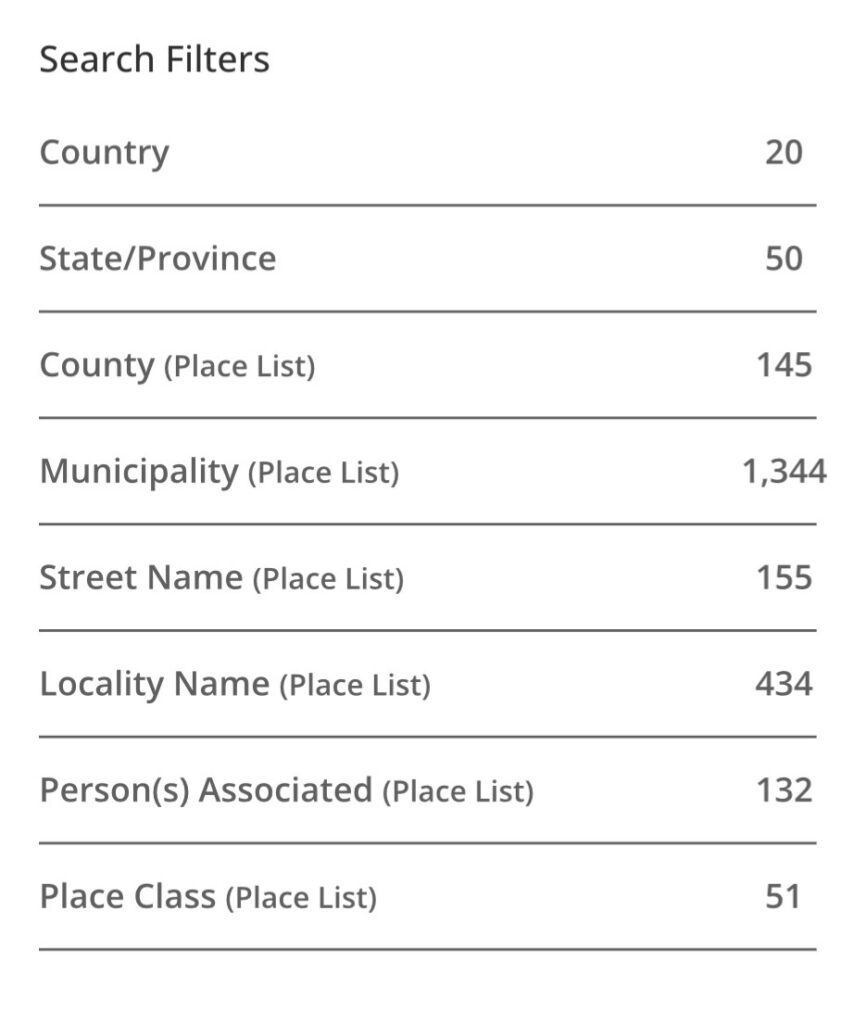
Search Filters will appear to the left of the search results. Use the filters to narrow down the choices. For instance, combine a placename with locality or class.
Filters available in the place search configuration are shown above. A few that may need explanation follow.
- country – used if not USA.
- locality – places like a village, college campus, named crossroads, or the area within Acadia National Park. More about Locality filters.
- type/class – feature like a beach, bridge, building, cape, church, dam, garden, island, lake, stream, summit, trail, etc. More about Place Class filters.
A second way to see if a place is listed is to begin typing the name in the field requiring a Place authority list entry, where the name may appear as a choice. Be aware that spelling variations and the word order often means missing an existing entry. The process is not as “fuzzy” as the place search.
Add A New Place or Edit an Entry
If the placename you are looking for is not found in your search, suggest a new entry. Select “Lists” in the far-left menu of Odyssey and search for and select “Place List.” Then select “Add Entry.” Complete the metadata fields that appear and click “Suggest” at the bottom of the entry form. We will add the place to the authority list and notify you when it is available.
To edit a Place list entry find the entry in the list and then click the edit pencil. Add or edit the appropriate information and then click “Suggest” at the bottom of the entry form.
